


Finding the best day trading platform for forex often comes down to fit. Some traders prioritise fast execution and automation, while others focus more on charting, flexibility, or mobile access.
This guide compares widely used options in 2026, including MetaTrader 4 (MT4), MetaTrader 5 (MT5), TradingView, and mobile trading apps. It explains what each platform is commonly used for, where it may suit different trading styles, and what to consider when trading forex via contracts for difference (CFDs).
Key Points
- MetaTrader 4 (MT4) is often seen as best for beginners and focused forex trading workflows.
- MetaTrader 5 (MT5) may suit traders who want more timeframes, order types, and automation features.
- TradingView is widely used for chart-based analysis, while mobile trading apps are commonly used for monitoring and managing forex CFD positions on the go.
What Makes a Good Forex Day Trading Platform?
A good forex day trading platform usually combines speed, clarity, and control. Active traders often compare the following features:
- Fast Order Execution and Low Latency: Orders are processed with minimal delay, helping reduce the risk of price slippage during fast-moving market conditions.
- Advanced Charting and Technical Indicators: Useful for analysing price movements, identifying patterns, and considering potential entry points.
- Range of Order Types: Order types such as market orders, limit orders, and stop orders allow traders to set predefined conditions for entering or exiting trades, supporting more structured trade management.
- Platform Stability During High-Volatility Market Sessions: A stable platform stays responsive and accessible during volatile market conditions or high trading volumes.
- Support For Automated or Algorithmic Trading: Allows traders to use predefined rules or automated systems to execute trades without manual input.
- Mobile and Desktop Access: Enables traders to monitor and manage positions across different devices, providing flexibility when away from their main trading setup.
The best day trading platforms for forex tend to share these traits. Even so, trading outcomes still depend on market conditions, individual strategy, and risk management.
However, trading outcomes ultimately depend on individual strategy, market conditions, and risk management.
Related Article: Forex Beginner Course — Basics of Risk Management
Quick Comparison: Best Platforms for Forex Day Trading
Not every trading platform serves the same purpose. Some are better suited to fast execution, some focus more on charting and analysis, and others support greater flexibility across devices.
For that reason, the best day trading platform for forex is rarely a one-size-fits-all choice. It usually depends on whether the priority is simplicity, advanced tools, visual analysis, or mobile access.
| Platform | Best For | Key Strengths | Limitations | When to Use It |
| MetaTrader 4 (MT4) | Best for beginners and focused forex day trading | Fast execution with low system requirements Large library of indicators and Expert Advisors (EAs) Clean, easy-to-learn interface | Fewer timeframes and order types compared with MT5 Instrument availability depends on the broker’s MT4 offering | You want a simple, lightweight platform for forex day trading |
| MetaTrader 5 (MT5) | Best for advanced traders and broader platform functionality | More timeframes and built-in technical indicators than MT4 Additional order types and Depth of Market (DOM) tools (availability and detail may vary by broker) Built-in economic calendar More advanced strategy testing and support for automated trading | Slightly steeper learning curve for beginners | You rely on detailed charting, automation, or more advanced platform tools—especially if you want access to a wider range of instruments through your broker |
| TradingView (with broker integration) | Best for chart-based analysis and discretionary workflows | Powerful charting tools and visual analysis features Large community library of shared indicators and trading ideas Custom scripting and indicators using Pine Script | Requires broker integration for live trading (or placing trades separately via your broker’s platform) | You want deep chart-based analysis and a flexible workflow before placing trades via your broker |
| Mobile Trading Apps | Best for flexibility and position management away from a desktop setup | The ability to place, modify, and close orders while on the go Real-time price alerts and push notifications (features may vary by app) Syncing across mobile, web, and desktop platforms (where supported) | Less suited to extended chart work or complex multi-chart analysis on smaller screens | You need to monitor and manage positions while on the move |
Different trading styles benefit from different tools. Choosing a forex day trading platform that aligns with individual trading styles is often more important than selecting the most advanced option, especially when trading forex via contracts for difference (CFDs).
Which Forex Day Trading Platform May Suit Beginners?
For beginners, the best platform is often the one that feels clear, stable, and manageable rather than the one with the longest feature list.
MetaTrader 4 (MT4) is commonly viewed as a strong starting point because its interface is simpler and more focused on core forex trading functions. It can be easier to learn for traders who want to understand charting, order placement, and trade management without too many added tools on screen.
TradingView may also appeal to beginners who prefer a more visual charting experience. Its layout is often seen as more modern, and its chart tools can make market analysis easier to follow.
By contrast, MetaTrader 5 (MT5) may suit beginners who already know they want access to more timeframes, more order types, and stronger automation features. While it offers more functionality, it may also take longer to get comfortable with.
For beginner traders, you can open a demo account to test out and compare platform layouts and workflows before deciding which one fits their needs.
MT4 vs. MT5 for Forex Day Trading
MetaTrader 4 (MT4) and MetaTrader 5 (MT5) look similar at first glance, but they are built differently and support different workflows. For forex day traders, the comparison usually comes down to simplicity versus broader functionality.
MT4 is often preferred for its lighter setup and familiar interface. MT5 is commonly chosen for its wider set of timeframes, order types, and analytical tools.
Execution Speed
Both MT4 and MT5 platforms are capable of high-speed day trading. However, MetaTrader 5 features a 64-bit, multi-threaded architecture, making it natively faster and more stable under heavy loads than the 32-bit, single-thread MT4.1
- Order Types: MT5 provides six types of pending orders, adding Buy Stop Limit and Sell Stop Limit to the standard four found in MT4. This can assist forex day traders in setting more precise entry triggers during high-volatility sessions.
- Depth of Market (DOM): Unlike MT4, MT5 includes a native DOM feature, allowing scalpers to view real-time liquidity and volume at different price levels.
- Accounting Modes: MT4 is limited to hedging (opening opposite positions simultaneously). Meanwhile, MT5 supports both hedging and netting, the latter of which allows consolidation of multiple positions in the same instrument into a single ‘net’ position, possibly providing traders with improved liquidity and competitive pricing features offered by the broker.
While MT4 remains efficient for basic execution, MT5 offers additional features and a multi-threaded architecture that may better support fast, intraday trading strategies.
Timeframes and Indicators
For intraday traders who require granular data to spot micro-trends, MT5 offers a significant analytical edge:
- Expanded Timeframes: MT5 features 21 timeframes (including M2, M3, M10, and H2) compared to just 9 in MT4. This is particularly useful for scalpers who need views between the standard 1-minute and 5-minute charts2.
- Indicator Library: MT5 ships with 38 built-in technical indicators and 44 analytical objects3, providing a more robust default toolkit than the 30 indicators found in MT4.4
It’s clear that while MT4 provides the essential tools for standard technical analysis, MT5’s expanded suite empowers day traders to perform high-precision, multi-dimensional charting to better identify micro-trends in today’s fast-moving forex market.
Strategy Testing and Automation
For both MetaTrader platforms, the key conceptual difference lies in their programming languages. MQL4 (MT40 is procedural and simpler to learn, while MQL5 (MT50 is an object-oriented language similar to C++5.
- Backtesting Speed: The MT5 Strategy Tester is multi-threaded, using your computer’s full processing power to run simulations hundreds of times faster than the single-threaded MT4 tester.
- Multi-Currency Testing: MT5 allows you to backtest a strategy across multiple currency pairs simultaneously, a feat impossible in the native MT4 environment.
One thing to note is that EAs and indicators built for MT4 cannot run on MT5 and vice versa and would need to be rewritten6.
Related Article: How to Backtest with MetaTrader 5 Strategy Tester
Ease of Use and Accessibility
Often perceived as ‘legacy’ software, MetaTrader 4 remains the most popular choice for retail forex traders due to its minimalistic setup and lower system requirements.
- Learning Curve: MT4’s focused environment may be less overwhelming for beginners who only wish to trade currency pairs.
- Community Support: As MT4 has been the industry standard since 2005, MT4 boasts a massive library of thousands of free third-party EAs and custom indicators7.
- Resource Efficiency: MT4 consumes significantly less RAM and CPU, making it the preferred option for traders using older hardware or basic VPS hosting.
In practice, MT4 remains popular for its cleaner, more intuitive interface, while MT5 is often preferred by forex day traders seeking more advanced tools and flexibility.
Related Article: MT4 vs MT5 Comparison – The Difference Between Metatrader 4 and 5
MetaTrader vs. TradingView for Forex Day Trading
While traders often wonder whether MetaTrader or TradingView is ‘better’, the ultimate question is how to integrate both platforms into an efficient trading workflow. MetaTrader (MT4/MT5) is often seen as the industry standard for backend execution while TradingView has become the go-to platform for market analysis and comprehensive charting.
Execution and Order Management
MetaTrader functions as a dedicated trading terminal designed for high-performance order routing. It offers a direct, low-latency link to a broker’s server, making it a popular choice for high-frequency forex day trading where milliseconds matter.
On the other hand, TradingView focuses mainly on charting, with trade execution depending on broker integration, which can add an additional layer of latency.
Charting and Technical Analysis
TradingView stands out for its visual clarity. Its Supercharts offers a highly intuitive interface with over 20 chart types (including Renko, Kagi, and Point & Figure), with an expansive library of drawing tools8. Moreover, its cloud-based nature allows traders to sync their analysis seamlessly across desktops, tablets, and smartphones.
While some traders feel that MetaTrader’s native aesthetics look dated, it still excels in offline charting and the ability to handle hundreds of open charts simultaneously without significant browser lag. For traders who rely on complex, multi-monitor setups, they may prefer MetaTrader to TradingView.
Automation and Strategy Development
The architectural difference between MetaTrader and TradingView is pretty significant:
- MetaTrader (MQL4/MQL5): Specifically built for automated execution, its EAs can monitor markets 24/5, manage risk, and execute trades without human intervention. Both MetaTrader platforms include a sophisticated Strategy Tester for deep historical backtesting.
- TradingView (Pine Script): Pine Script is highly regarded for its ease of use in creating custom indicators and alerts. TradingView also has WebhookTrade to connect it to MetaTrader platforms so traders can automate their trades.
Related Article: The Complete Guide to Backtesting Strategies on TradingView
Ease of Use and Accessibility
TradingView offers a more modern-looking interface with a built-in social network that day traders can share ideas, stream their screens, and follow top-ranked analysts9. This makes it highly accessible for beginners and those who value community-driven insights.
MetaTrader has a steeper learning curve but is optimised for utility. Its interface allows for faster navigation between symbols and more efficient management of complex trade orders. For a forex day trader who needs to manage multiple partial closes or trailing stops across several currency pairs, MetaTrader’s dedicated ‘Terminal’ window is highly favoured as it provides an overview of the various features of multiple modules, such as trade, account history, news, alerts, mailbox, and journals.
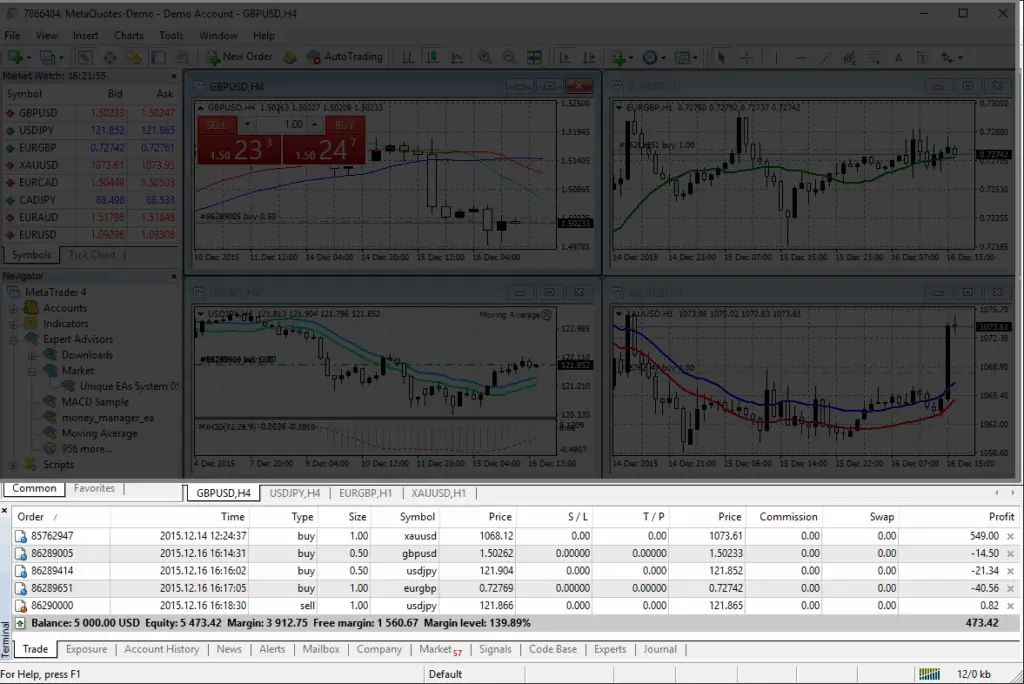
The Terminal window enables analysis of financial instruments using interactive charts and technical indicators.
In reality, many forex day traders adopt a hybrid approach: They analyse the market using the visual tools and community indicators of TradingView, then place trades on MetaTrader to optimise for fastest possible execution and most reliable order management.
Are Mobile Trading Apps Suitable for Forex Day Trading?
Mobile trading apps now play a much bigger role in forex day trading than they did in the past. Traders are no longer limited to desktop platforms to monitor markets, manage positions, or respond to price movements in real time.
In 2026, mobile apps offer access to live pricing, charting, alerts, and order management across the global forex market, which reached $9.6 trillion in daily turnover in April 202510. Even so, many traders still use mobile apps alongside desktop platforms rather than as a full replacement.
For many forex day traders, mobile apps are most useful for monitoring open positions and reacting quickly when away from a desk. They can be used to place or close trades, respond to alerts, and adjust stop-loss or take-profit levels during volatile market conditions.
They can also be helpful during active trading windows such as the London and New York session overlap, typically between 13:00 and 17:00 GMT 11. During these hours, price movement can become more reactive to economic data and market news, so staying connected may matter more.
That said, mobile apps still have practical limits. Smaller screens can make it harder to analyse multiple timeframes, compare charts, or work with more detailed indicators and overlays.
Because of this, many traders take a hybrid approach:
- Desktop for analysis: Better suited to detailed chart work, broader market review, and multi-screen setups.
- Mobile for execution and monitoring: Useful for managing trades and staying connected while on the move.
Mobile trading apps can support forex day trading on their own, but they are often used as part of a broader trading setup rather than the only platform a trader relies on.
5 Key Considerations When Choosing a Forex Day Trading Platform
Selecting the best forex day trading platform is a strategic yet highly subjective decision that can impact your edge in the market. Before committing capital, traders should consider these five factors:
- Execution Latency and Platform Stability: In day trading, milliseconds matter. That’s why traders typically look for platforms that offer low-latency execution to ensure their orders are filled at their requested price while minimising slippage during high-volatility events like central bank announcements.
- Available Order Types and Risk Management Tools: These tools are designed to help limit losses and manage trades automatically. However, it’s important to note that standard risk management tools do not guarantee protection against slippage in highly volatile markets.
- Broker Infrastructure and Liquidity: The platform is an interface, but the broker’s liquidity pool determines the spreads and fill quality. Robust infrastructure ensures that the price feed remains stable even when global trading volume spikes.
- Access to Demo Accounts For Practice: A demo accounts lets you practise trading risk-free and fine-tune your strategies in an environment that mirrors live market conditions.
- Regulatory Compliance and Security: When choosing a broker for forex CFDs, consider whether they are regulated by well-known authorities. For example, the Financial Conduct Authority (FCA) in the UK or the Australian Securities and Investments Commission (ASIC) — depending on the entity you trade with. Brokers typically use segregated client funds and high standards of data encryption to help protect your financial integrity.
A forex day trading platform is only part of the equation; the broker supporting it plays an essential role in real-world trading performance.
Choosing the Best Platform for Day Trading Forex
There is no single ‘best’ platform for forex day trading.
MT4, MT5, TradingView, and mobile trading apps each serve different purposes and suit different trading styles when trading forex via CFDs. The right choice depends on your experience level, your specific analytical style, and your trading frequency.
For traders looking to day trade forex via contracts for difference (CFDs), platforms such as MT4 and MT5 are commonly used to trade through CFD brokers like Vantage.
Vantage allows for:
- Leveraged Exposure: Controlling larger positions with a smaller initial margin.
- Two-Way Trading: The ability to go long or short on currency pairs.
This flexibility is commonly used among CFD traders who focus on short-term price movements rather than long-term ownership.
For those exploring forex day trading via CFDs for the first time, it’s encouraged to open a Demo Account with Vantage to familiarise yourself with the platform’s features and mechanics. Once you’re ready to trade currency pairs in the live market, you can consider opening a Vantage Live Account.
FAQs
What is day trading forex, and why does the platform choice matter?
Day trading forex involves opening and closing currency positions within the same trading day to focus on short-term price movements. Because this style depends on speed and timing, platform choice can affect chart access, order placement, execution, and overall trade management.
What is the best platform for forex day trading?
The ‘best’ platform for forex day trading is highly subjective and depends on your specific workflow.
As of 2026, MT4 and MT5 are widely used for high-speed execution and automated trading. On the other hand, TradingView is popular for technical analysis while mobile apps support trade monitoring and management on the go.
What is the best day trading platform for beginners?
For beginners, MT4 is often viewed as a practical starting point because it has a more straightforward layout and focuses on core trading functions. Some beginners may also prefer TradingView for its charting interface and visual ease of use.
Is MetaTrader or TradingView better for day trading?
MetaTrader (MT4/MT5) is generally preferred for backend execution, offering lower latency and robust Expert Advisor (EA) support. Meanwhile, TradingView excels in frontend analysis, offering a more intuitive interface and countless community-sourced indicators.
Many forex day traders usually perform chart analysis on TradingView and execute their orders with a MetaTrader-supported broker.
Is MT4 or MT5 better for day trading?
Given MT4’s simpler interface and lower learning curve, it’s more popular with beginners. In comparison, MT5 offers highly advanced tools, a wider range of timeframes, a built-in economic calendar, and a 64-bit architecture, making it a favourite among more experienced day traders.
Can mobile trading apps be used for forex day trading?
Yes, modern mobile trading apps support real-time execution and risk management. However, due to limited screen real estate and processing power compared to desktop setups, they are best used for monitoring active positions and reacting to news—many traders still prefer using desktop platforms for conducting deeper analysis.
Are forex day trading platforms free to use?
Most brokers provide MT4 and MT5 at no extra cost to the trader. TradingView offers a free tier, though advanced features like multiple chart layouts and high-frequency alerts require a paid subscription. While such software is free to use, traders remain responsible for trading costs such as spreads, commissions, and margin requirements typically associated with CFD trading.
RISK WARNING: CFDs are complex financial instruments and carry a high risk of losing money rapidly due to leverage. You should ensure you fully understand the risks involved and carefully consider whether you can afford to take the high risk of losing your money before trading.
Disclaimer: The information is provided for educational purposes only and doesn’t take into account your personal objectives, financial circumstances, or needs. It does not constitute investment advice. We encourage you to seek independent advice if necessary. The information has not been prepared in accordance with legal requirements designed to promote the independence of investment research. No representation or warranty is given as to the accuracy or completeness of any information contained within. This material may contain historical or past performance figures and should not be relied on. Furthermore estimates, forward-looking statements, and forecasts cannot be guaranteed. The information on this site and the products and services offered are not intended for distribution to any person in any country or jurisdiction where such distribution or use would be contrary to local law or regulation.
References
- “Comparison of MetaTrader 5 and MetaTrader 4 – MetaTrader 5” https://www.metatrader5.com/en/brokers/comparison-mt5-mt4. Accessed on 18 January 2026.
- “MetaTrader 5 for iPhone/iPad: Bulk operations, 21 timeframes, and trading notifications – MetaTrader 5” https://www.metatrader5.com/en/news/2328. Accessed on 18 January 2026.
- “Technical analysis in MetaTrader 5 – MetaTrader 5” https://www.metatrader5.com/en/trading-platform/technical-analysis. Accessed on 18 January 2026.
- “Technical analysis – MetaTrader 4” https://www.metatrader4.com/en/trading-platform/technical-analysis. Accessed on 18 January 2026.
- “How to Create an Expert Advisor or an Indicator – MetaTrader 5” https://www.metatrader5.com/en/terminal/help/algotrading/autotrading. Accessed on 18 January 2026.
- “Migrating from MQL4 to MQL5 – MQL5” https://www.mql5.com/en/articles/81. Accessed on 18 January 2026.
- “MQL4 Source Codes of Technical Indicators for MetaTrader 4 – MQL5” https://www.mql5.com/en/code/mt4/indicators. Accessed on 18 January 2026.
- “Chart types available on TradingView – TradingView” https://www.tradingview.com/support/solutions/43000703407-chart-types-available-on-tradingview/. Accessed on 19 January 2026.
- “Trading, never alone – TradingView” https://www.tradingview.com/social-network/. Accessed on 19 January 2026.
- “Global FX trading hits $9.6 trillion per day in April 2025 and OTC interest rate derivatives surge to $7.9 trillion: Triennial Survey – BIS” https://www.bis.org/press/p250930.htm. Accessed on 19 January 2026.
- “London & New York overlap session: Best Daily 4 Hrs Of Trading! – TradingView” https://www.tradingview.com/chart/GBPUSD/B9Kel9su-London-New-York-overlap-session-Best-Daily-4-Hrs-Of-Trading/. Accessed on 19 January 2026.