


 Updated
Synthetic indices, offered by Vantage as CFDs, are available for trading 24/7 and can show consistent volatility patterns. However, as with all leveraged products, trading them carries a high risk of loss. They’re algorithm-based assets that simulate market movements without being tied to real-world financial instruments.
Vantage provides access to synthetic indices as CFDs on MetaTrader 5 (MT5), a widely used trading platform. This guide will walk you through setting up MT5, opening your Vantage account, and adding synthetic indices to your charts.
Key Points
- Synthetic indices, offered as CFDs, are algorithm-driven assets that offer 24/7 trading with consistent volatility, unaffected by real-world news events.
- Vantage enables simple setup and fast access to synthetic indices CFDs on MetaTrader 5, with support and demo accounts available for new users.
- Traders can easily configure charts, place trades, and manage positions on MT5 using Vantage’s step-by-step platform guide.
What Are Synthetic Indices?
Synthetic indices are digital instruments that replicate the behaviour of real financial markets using mathematical algorithms. Unlike traditional assets, they aren’t linked to any economic data, companies, or countries.
Some key features of trading synthetic indices include:
- 24/7 Trading: Trade any time, even on weekends.
- No News Impact: Prices aren’t swayed by geopolitical events or headlines.
- Consistent Volatility: Choose from indices with varying levels of volatility.
- High Leverage: Allows greater exposure, but also increases risk.
Vantage offers access to a diverse range of synthetic indices via CFDs on MT5, providing traders with flexible options to suit various trading strategies.
Why Trade Synthetic Indices CFDs on MT5 with Vantage?
Trading synthetic indices CFDs with Vantage on MetaTrader 5 combines accessibility with performance. Setup is simple, execution is fast, and support is always available.
When trading with Vantage, you get:
- Easy Access: Seamless MT5 integration with quick account setup.
- Low Costs: Competitive spreads and zero sign-up fees.
- Fast Execution: Designed to minimise slippage and delays.
- Trusted Broker: Regulated with strong client fund protection.
- Support You Can Count On: Dedicated assistance for MT5 and synthetic indices CFDs trading.
- Demo Account Available: Practise with no risk before going live.
The MetaTrader 5 platform offers multiple benefits such as:
- Intuitive layout, even for first-time traders.
- Dozens of chart types and technical indicators.
- Supports automated strategies with Expert Advisors (EAs).
- Flexible timeframes and tools for deeper analysis.
Step-by-Step Guide: Setting Up MT5 for Synthetic Indices
Getting started is easier than you think. In this section, we’ll walk you through each step—downloading MetaTrader 5, creating your Vantage account, logging in, and adding synthetic indices to your platform.
Follow these steps to set up your MT5 environment and start trading synthetic indices CFDs with more confidence.
1. Downloading and Installing MetaTrader 5
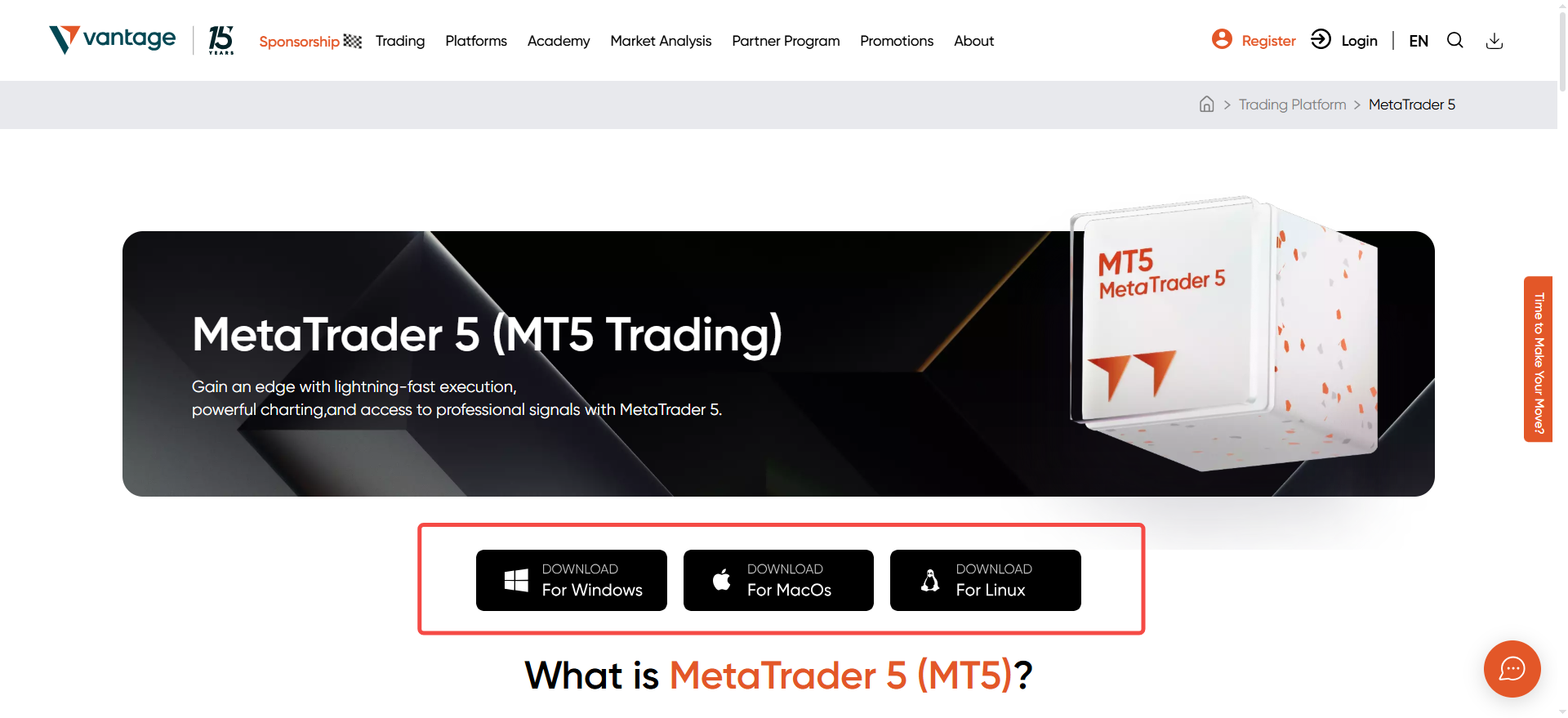
You can download MetaTrader 5 directly from the Vantage website. It’s free and available for desktop and mobile.
MT5 works on desktop systems like Windows and macOS, as well as mobile devices running iOS or Android.
Installation Steps:
(1) Click the download link for your device.
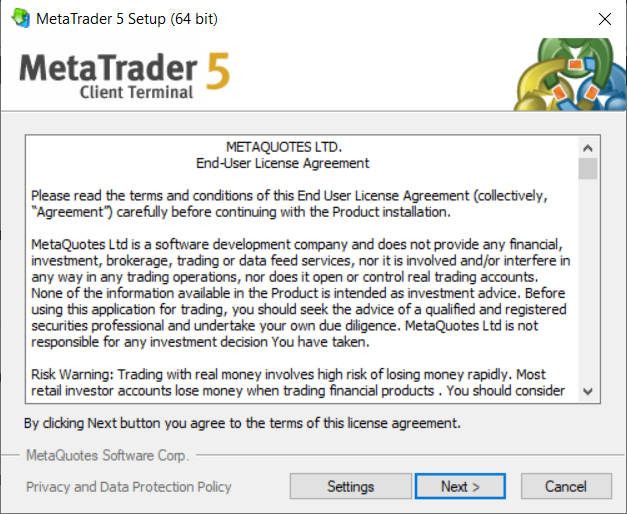
(2) Open the downloaded file and follow the setup instructions.
(3) Once installed, launch MT5 and move on to account setup.
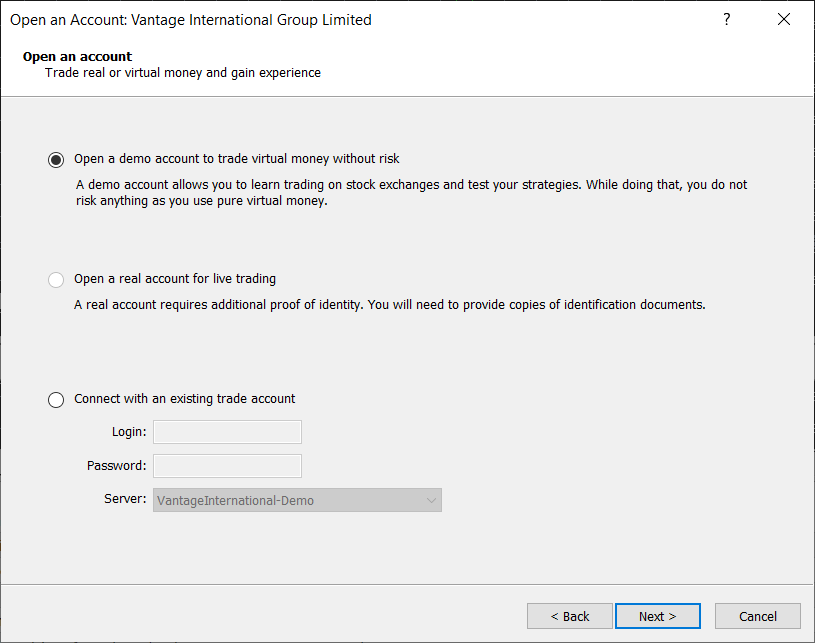
2. Opening Your Vantage Live Account for Synthetic Indices CFDs Trading
To start trading, you’ll need a Vantage live account. After completing the sign-up process, you will be able to trade synthetic indices CFDs using these account types:
If you’re not ready to trade in live markets, open a free demo account to trade synthetic indices CFDs in a risk-free environment. It’s a great way to get familiar with MT5 before going live.
3. Logging into MT5 with Your Vantage Account
Once your account is ready, log into MT5 using your credentials.
Steps:
(1) Open the MT5 platform.
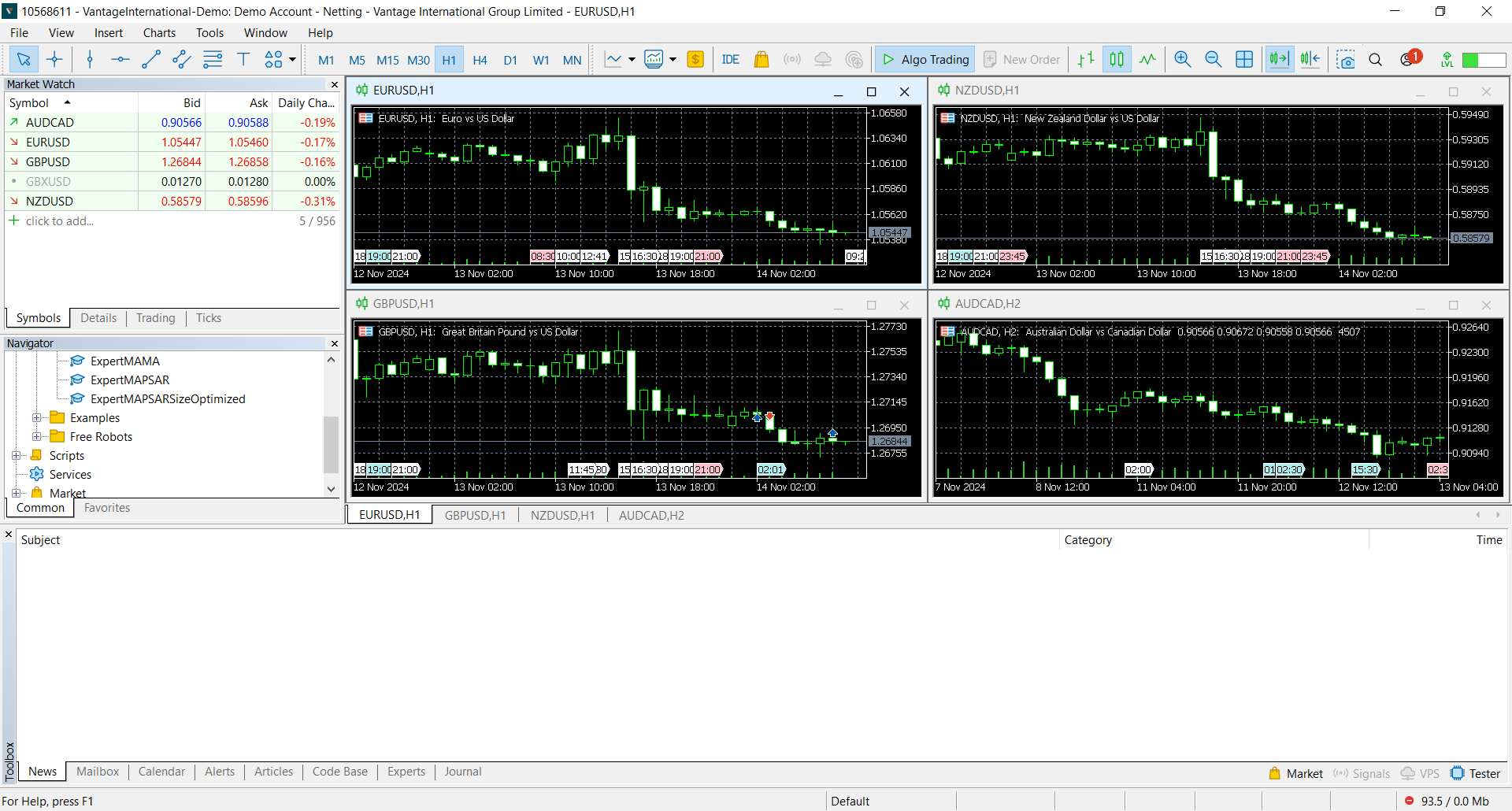
(2) Click File > Login to Trade Account.
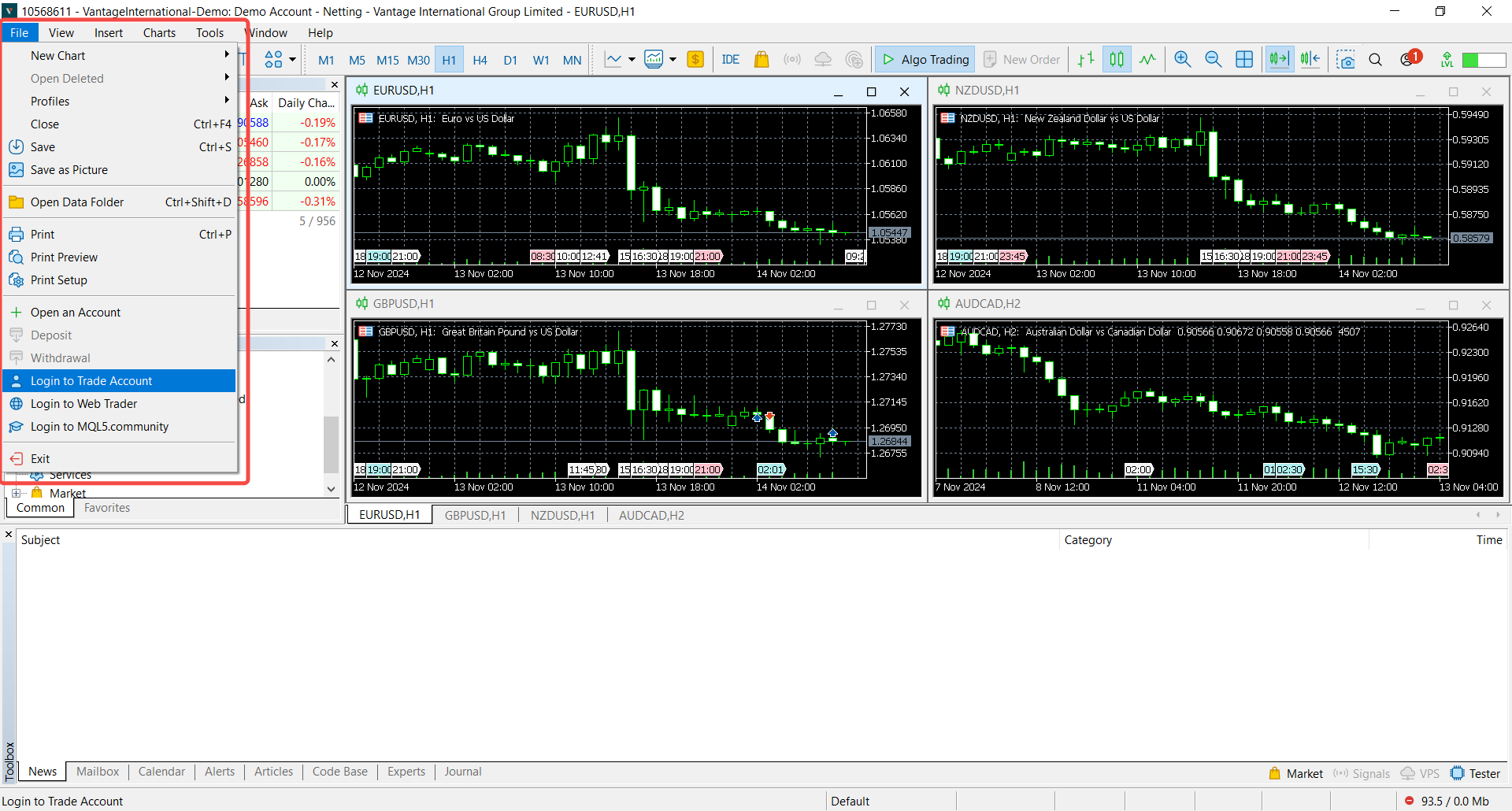
(3) Enter your login ID, password, and select the correct server.
Server: MT5 AU3 (for Synthetic Indices accounts on Vantage)
(4) Click Login, and your account will connect.
4. Adding Synthetic Indices to Your Watchlist
To view and trade synthetic indices CFDs, you need to add them to your MT5 Market Watch.
Steps:
(1) Open MT5 and press Ctrl+M to bring up the Market Watch window.
(2) Right-click anywhere in the window and select Symbols.
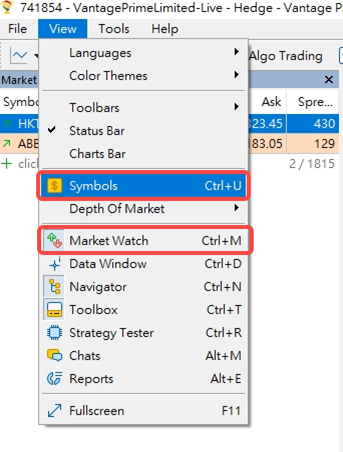
(3) Scroll or search for the Synthetic Indices group.
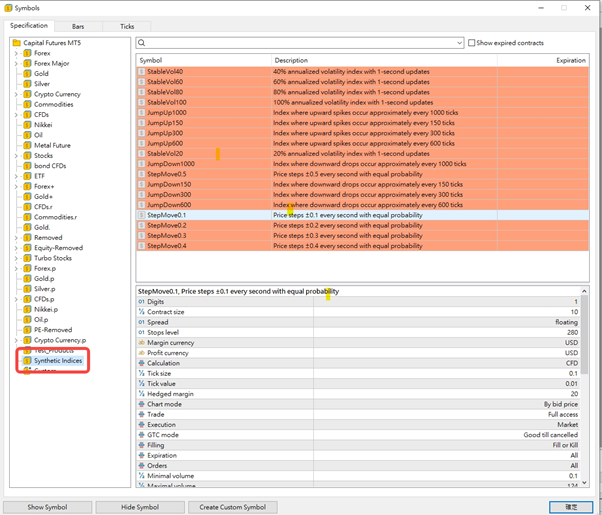
(4) Select the instruments you want and click Show.
Your selected indices will now appear in the Market Watch panel.
5. Opening and Customising Synthetic Indices Charts
To analyse price movements and trade synthetic indices, set up your chart layout:
Steps:
- In the Market Watch panel, right-click on the index you want and select Chart Window.
- Use the top toolbar to adjust chart types, timeframes, and indicators.
- Right-click on the chart for more options like gridlines, properties, and templates.
You can also save your preferred layout as a template for quick access next time.
Placing Your First Trade on Synthetic Indices CFDs with MT5
Once your MT5 platform is set up, placing a trade is straightforward. Here’s how to do it step by step.
1. Select Your Symbol
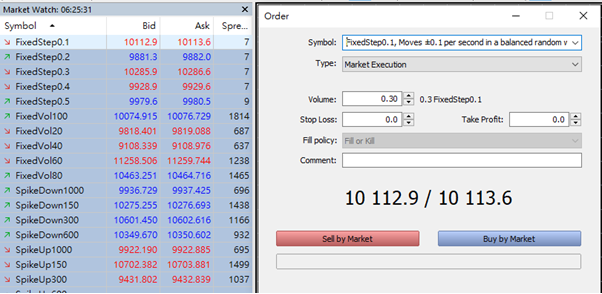
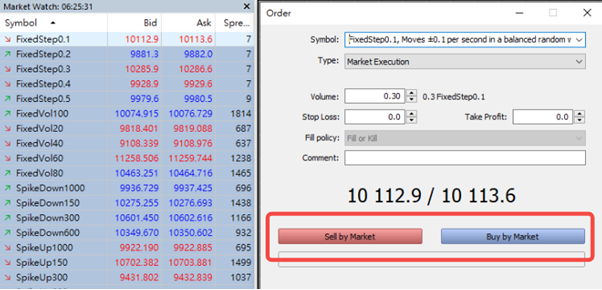
Double-click the synthetic index you want to trade in the Market Watch panel. This opens the order window.
2. Configure Your Trade
Choose your trade volume (lot size), order type (Market or Pending), and set your Stop Loss and Take Profit levels. These are crucial for managing risk, especially in volatile synthetic markets.
3. Leverage and Lot Sizes
Vantage offers flexible leverage. Higher leverage increases both potential gains and losses, so always trade with a clear strategy. Lot sizes vary depending on the index, so start small if you’re still learning.
4. Open the Trade
Click Buy or Sell based on your market view. Your trade will appear in the Terminal window at the bottom.
5. Monitor and Manage
From the Terminal, track your trade’s performance, modify stop loss or take profit levels, or close the trade manually when needed.
Getting Started with Synthetic Indices CFDs on MT5 with Vantage
Getting started with synthetic indices CFDs on MT5 is easier than you might think. With Vantage, you’ll be up and running in just a few steps—download the platform, create your account, and add synthetic indices to your watchlist.
Open a live account to start trading synthetic indices CFDs with Vantage today.
RISK WARNING: CFDs are complex financial instruments and carry a high risk of losing money rapidly due to leverage. You should ensure you fully understand the risks involved and carefully consider whether you can afford to take the high risk of losing your money before trading.
Disclaimer: The information is provided for educational purposes only and doesn’t take into account your personal objectives, financial circumstances, or needs. It does not constitute investment advice. We encourage you to seek independent advice if necessary. The information has not been prepared in accordance with legal requirements designed to promote the independence of investment research. No representation or warranty is given as to the accuracy or completeness of any information contained within. This material may contain historical or past performance figures and should not be relied on. Furthermore estimates, forward-looking statements, and forecasts cannot be guaranteed. The information on this site and the products and services offered are not intended for distribution to any person in any country or jurisdiction where such distribution or use would be contrary to local law or regulation.